Knowledge is Power
Skype for Business and Microsoft Teams Network Testing
If you want to easy test your network connection to Skype for Business Online and Microsoft Teams server from a GUI perspective?This is possible with a tool created by Korneel Bullens and is located in the Network Planner inside FastTrack. The setup is really easy and the outcome is very clear.
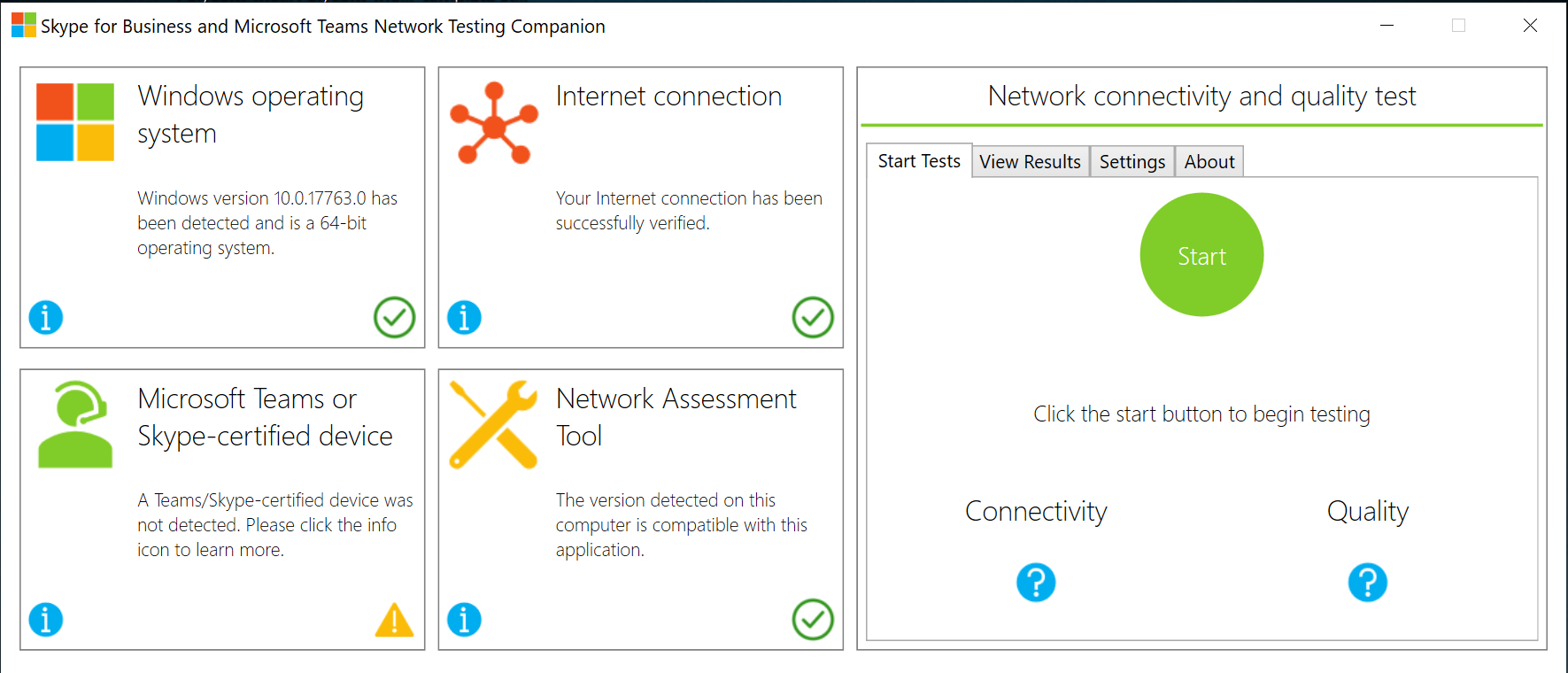
/
Network Testing Companion Installation and Usage Guide
Prerequisites
- Windows 7 or later
- Windows Management Framework 5.1
- You must have a local Administrator account to install.
Installation
Anyone who has administrator rights to the computer can install the Network Testing Companion. The tool is hosted on PowerShell Gallery and can be installed as follows:
…Sending Audio Messages from the Mobile Teams client
Sending Audio Messages
You are now able to record and send audio messages on the Teams mobile clients. It works for both chat and channel conversations. Web and desktop clients will also support listening of the received audio clips.

Audio message support has been a top customer ask since the early days of the product. (Link to uservoice)
/
…Shared Line Appearance in Microsoft Teams
What is Shared Line Appearance
Shared Line Appearance handles multiple calls on a specific number called a shared number. Shared Line Appearance can configure any enterprise voice enabled user as a shared number with multiple lines to respond to multiple calls. The calls are not actually received on the shared number, instead they are forwarded to users that act as delegates for the shared number.
Any one of the delegates can pick up the call while the rest of the delegates get a notification on their phone about who picked up the call and which line has become busy as a result.
…New phone what about Multi Factor Authentication(MFA) in Azure?
Do you know the feeling of loosing your data when buying a new phone? Just before the holidays i decided to buy a new phone. Traditionally i’m a Apple fanboy for year, started with the iPhone
- My last device was a iPhone 7 with the Apple Watch series
- After some research in what i actually wanted/needed the OnePlus 6T was the best option for me (cost/performance).
Because i’m using the Microsoft Authenticator for quite some time and have most of my MFA accounts in there it was time to change all of the accounts. I’m using Office365 a lot, so i will describe how to this for your Azure account.
…How to use Microsoft Teams Templates
Working in project groups means standardize your workflow to work more efficient. Also this has a benefit for your employees to find everything in the same place and structure.
Create a Team based on a template.
In Microsoft Teams go to “Join or create a team”.
/

Select “Create team”

Click “Create a team using an existing team as a template”.

Now select your base template that you want to copy.
…Call Park in Microsoft Teams
Call Park
Call Park provides you the ability to park an active call and then allow yourself or someone else to pick up the call using a (specific) code. You communicate the code out-of-band.
Call Park Feature
Parking a call: you can park an active call by clicking on the “Park” button in the call control.
If no one retrieves the call within 5 minutes, it will ring you back. If you don’t pick-up the call, it will follow your configured unanswered roles (i.e. voicemail if configured).
…Microsoft Teams Licensing Guide
Some time ago i wrote an article to explain the licensing in Skype for Business Server and Skype for Business Online [The Skype for Business licensing guide], with the change to Teams i want to give you some insight in this licensing to:
/
Users in Teams (base license)
Every user that want to make use of Teams needs a Teams license.
Cloud voice features
Audio Conferencing (addon)
Sometimes people in your organization will need to use a phone to call in to a Microsoft Teams meeting, instead of using their computer. Use the Audio Conferencing feature for this situation.
…Branding your Office365 Login Screen
Using your organization’s logo and custom color schemes to provide a consistent look-and-feel on your Azure Active Directory (Azure AD) sign-in pages. Your sign-in pages appear when users type in their sign in to your organization’s web-based apps, such as Office 365, which uses Azure AD as your identity provider.
/
[caption id=“attachment_1995” align=“alignnone” width=“665”] My Example[/caption]
Some people maybe notice where this background is from, for the ones that don’t know this is from Mr Robot.
…Changing your presence from the Teams Desktop Client
Last week Microsoft released the a small but in my opinion a fundamental feature that i was using many times a day in Skype for Business.
It’s now possible to change your presence status from either the system tray menu or buttons below the Aero thumbnail and changing the presence from the menu (via profile picture) also still exists.
/
Aero thumbnail
[caption id=“attachment_1989” align=“alignnone” width=“275”] Aero Thumbnail[/caption]
System Tray Menu
[caption id=“attachment_1990” align=“alignnone” width=“356”] System Tray[/caption]
Route all traffic by OpenVPN
In October i posted a blog about setting up your OpenVPN server in 2 minutes.
This blog is a addon to your existing configuration to route all traffic over the VPN.
/
Change server configuration
go to the config file (/etc/openvpn/server.conf) and add the following lines:
    push "redirect-gateway def1"
    push "dhcp-option DNS "
    push "dhcp-option DNS 1.1.1.1"
Restart your OpenVPN daemon
sudo /etc/init.d/openvpn restart
Change client configuration
Change your client config, and add the following line
…