
All my websites have lived in Azure DevOps for years. Repositories in Azure Repos, builds in Azure Pipelines, and hosting on Azure Static Web Apps or Azure App Service. It worked, and I never really had a reason to change it.
That changed when I started using AI for more than just writing code snippets. I wanted to be able to say “check if my site still builds”, “clean up this repository” or “fix this and deploy it” from a chat window, also from my phone, and have the work actually done. Not a suggestion I have to copy and paste, but a branch, a commit and a pull request I only need to review.
That turned out to be the real reason to move to GitHub.
In this post I explain how I migrated my repositories from Azure DevOps to GitHub, how I connected them to Claude, and what that looks like in practice. The example I use is the repository of this blog, which I migrated today.
Why move from Azure DevOps to GitHub?
Azure DevOps is a solid platform, and for many organizations it is still the right choice. For my personal sites, one practical limitation made the decision for me:
Claude can work on code in an isolated cloud environment, but cloning repositories and creating pull requests requires GitHub. Azure Repos is not supported for that workflow.
So if I want an AI assistant that can do the work end to end, including opening a pull request that I can review, the code needs to live on GitHub.
There were some other benefits as well:
- GitHub Actions is well documented for Azure Static Web Apps, including preview environments for pull requests.
- Everything about a change lives in one place: code, pull request, build and deployment status.
- I already used GitHub for my public scripts and tools, so this brings everything together.
The migration from Azure DevOps to GitHub
The migration itself is the easy part. I did one site at a time and started with sjaspatat.com as a pilot, followed by my links page and then this blog.
Step 1: Create an empty private repository on GitHub
Create a new repository on GitHub, for example erwinbierens/erwinbierens.com. Make it private and do not add a README, license or .gitignore. The repository must be empty, otherwise the push in the next step will conflict.
Step 2: Mirror the repository from Azure DevOps
A mirror clone copies everything: all branches, tags and the full history.
git clone --mirror https://dev.azure.com/<organization>/<project>/_git/<repository>
cd <repository>.git
git push --mirror https://github.com/<user>/<repository>.git
After this, the GitHub repository is an exact copy of the one in Azure DevOps.
If you prefer to keep working in your existing local folder, you can also change the remote instead:
git remote set-url origin https://github.com/<user>/<repository>.git
git push -u origin --all
git push origin --tags
Step 3: Move the deployment to GitHub Actions
This is the step that is easy to forget. Your Azure Pipeline still points to the Azure DevOps repository, so a push to GitHub does not deploy anything yet.
For Azure Static Web Apps you need two things:
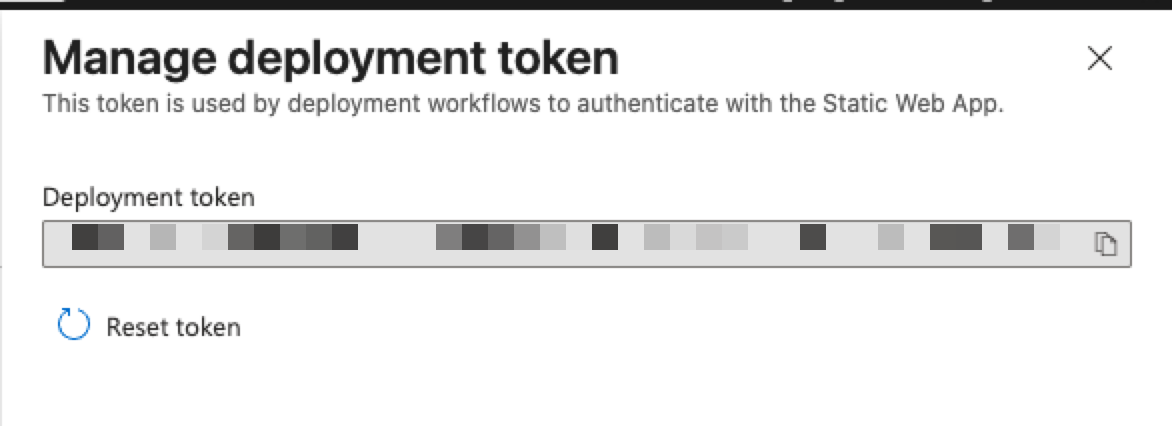
- The deployment token of the Static Web App. In the Azure portal, open your Static Web App and choose Manage deployment token.
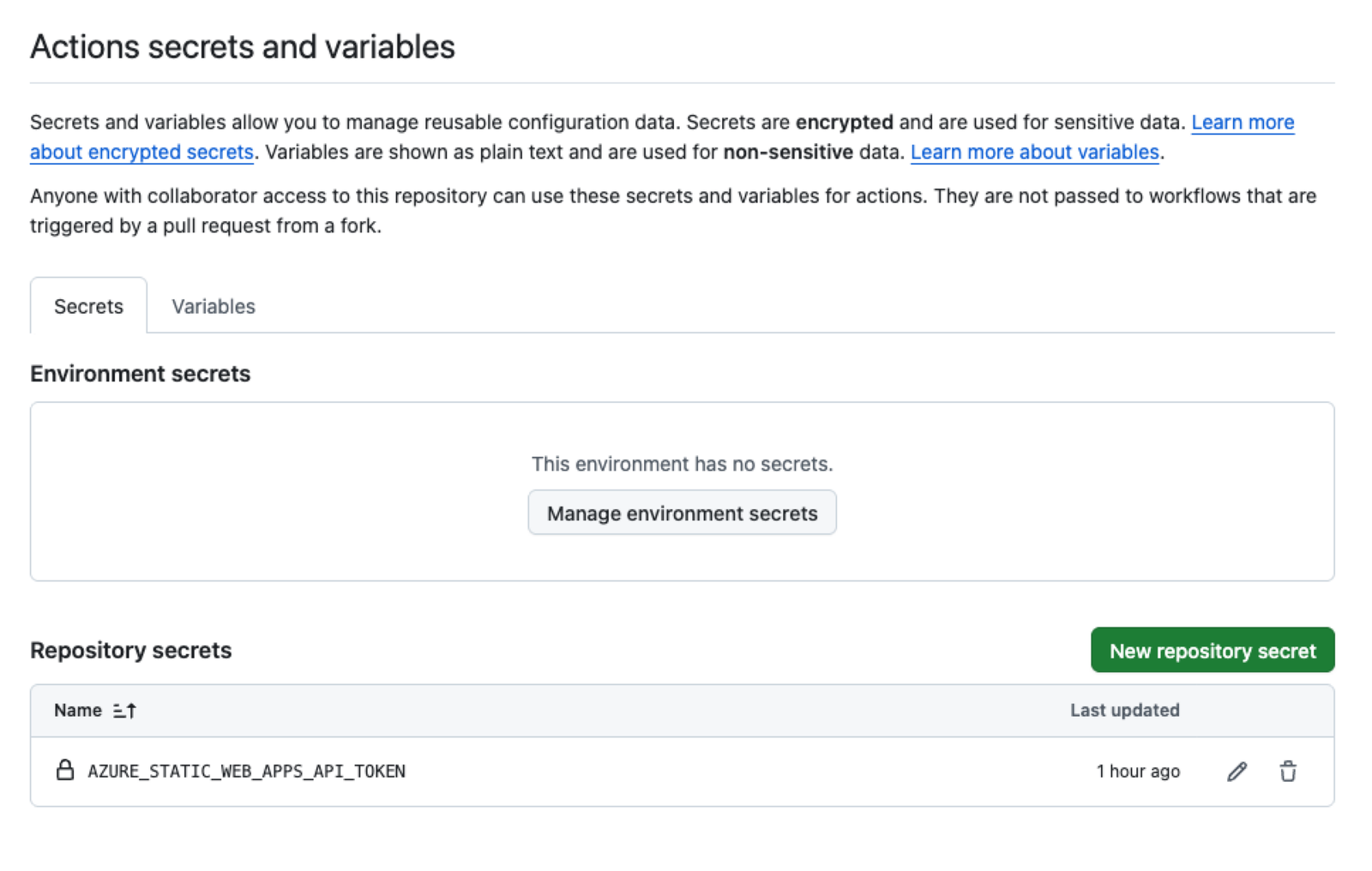
- A repository secret on GitHub with that token. Go to Settings > Secrets and variables > Actions and add it as
AZURE_STATIC_WEB_APPS_API_TOKEN.
Then add a workflow file to .github/workflows/. This is the one this blog now uses. It builds the Astro site and deploys the dist/ folder:
name: Build and deploy to Azure Static Web Apps

on:
  push:
    branches:
      - main
  pull_request:
    types: [opened, synchronize, reopened, closed]
    branches:
      - main
  workflow_dispatch:

permissions:
  contents: read
  pull-requests: write

jobs:
  build_and_deploy:
    if: github.event_name != 'pull_request' || github.event.action != 'closed'
    runs-on: ubuntu-latest
    steps:
      - uses: actions/checkout@v4
        with:
          submodules: true

      - uses: actions/setup-node@v4
        with:
          node-version-file: .nvmrc
          cache: npm

      - run: npm ci
      - run: npm run build

      - uses: Azure/static-web-apps-deploy@v1
        with:
          azure_static_web_apps_api_token: ${{ secrets.AZURE_STATIC_WEB_APPS_API_TOKEN }}
          repo_token: ${{ secrets.GITHUB_TOKEN }}
          action: upload
          app_location: dist
          api_location: ""
          output_location: ""
          skip_app_build: true

  close_pull_request:
    if: github.event_name == 'pull_request' && github.event.action == 'closed'
    runs-on: ubuntu-latest
    steps:
      - uses: Azure/static-web-apps-deploy@v1
        with:
          azure_static_web_apps_api_token: ${{ secrets.AZURE_STATIC_WEB_APPS_API_TOKEN }}
          action: close
A nice extra: every pull request gets its own preview environment on Azure Static Web Apps, and that environment is removed automatically when the pull request is closed.
I build the site myself in the workflow and use skip_app_build: true. That way I control the Node version through .nvmrc, and the build runs exactly the same as on my own machine.
Step 4: Disable the old Azure Pipeline
Once the first deployment from GitHub works, disable the pipeline in Azure DevOps and remove azure-pipelines.yml from the repository. Otherwise you risk two pipelines deploying to the same site.
Connecting the repositories to Claude
To let Claude work on your repositories, it needs access to GitHub. You do this by installing the Claude GitHub App and granting it access to the repositories you choose. I only granted access to my website repositories, not to everything.
What I like about the setup:
- Claude works in an isolated cloud environment, not on my own machine.
- My GitHub credentials do not end up in that environment. According to the documentation, GitHub traffic goes through a proxy that adds the credentials on the server side.
- Claude works on a separate branch and delivers its changes as a pull request. Nothing reaches production until I merge it.
That last point is important to me. The AI does the work, but I stay in control of what goes live.
What this looks like in practice
The best way to show this is with what happened today. After I pushed this blog to GitHub, I typed one short message in Dutch, which translates to:
“I just created erwinbierens.com as a repo in GitHub and converted everything, can you check if everything works?”
That is all. No checklist, no instructions on what to test. Claude then did the following on its own:
- Looked up the repository in my GitHub account and cloned it.
- Ran a clean install and build, exactly like the pipeline does (
npm ciandnpm run build): 745 pages, no errors. - Compared the live website with the build output, to confirm the current site matched the repository.
- Checked how the site is deployed.
And then it came back with a finding I had completely missed:
There was no GitHub Actions workflow in the repository. The deployment files were still Azure DevOps pipelines, which GitHub does not run. The site looked fine, but only because it was still the last deployment from Azure DevOps. My next blog post would never have gone live.
It also found some things I would rather not admit:
node_moduleswas committed to the repository. That is 8,088 files. A bit awkward, since I recently wrote a post on how to keep Git repositories small.- Several duplicate files created by macOS Finder, like
content 2.tsand older copies of blog posts named... 2.md. One of them caused a route conflict during the build. - Editor settings (
.idea) in the repository, and links in the README pointing to folders on my own Mac.
Claude explained what it found and asked if it should fix it in a pull request. I replied with two words: “ja graag” (yes please).
What followed:
- A new branch, with the GitHub Actions workflow, the cleanup and an updated README.
- Before deleting any duplicate file, Claude compared it with the original first. The “ 2“ copies turned out to be older versions with outdated image links, so the originals were kept. One file named
... - Copy.mdturned out to be the only version of that post. That one was renamed instead of deleted. - A new build to verify the result: still 745 pages, the route conflict gone, and the generated file list identical to before, except for one unused duplicate image.
- A pull request with a clear description of what changed and why.
- A check of the GitHub Actions run on that pull request: build and deployment to the preview environment both succeeded.
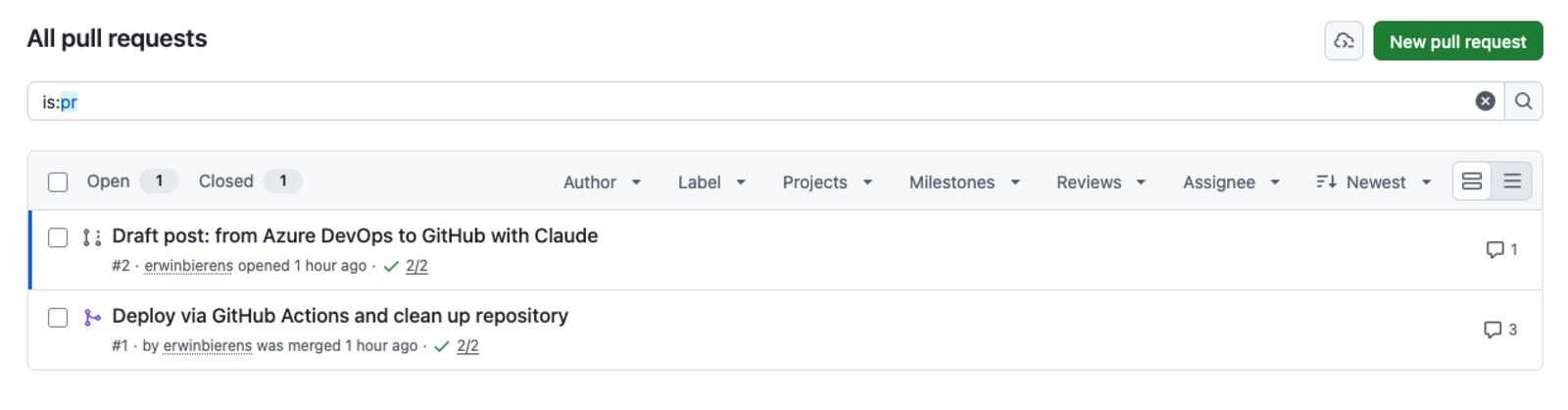
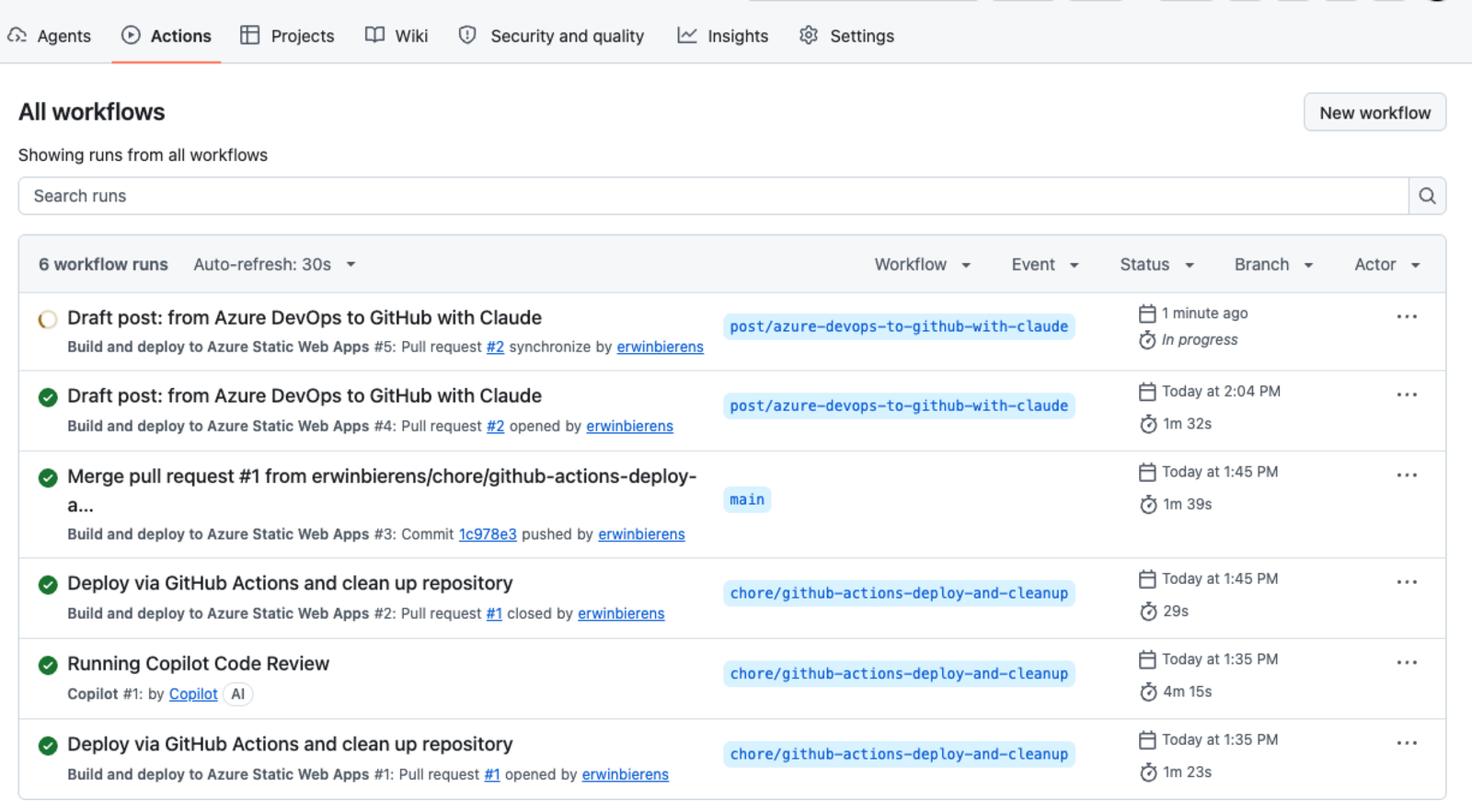
I reviewed the pull request, merged it, and the site was deployed to production through GitHub Actions for the first time.
From my first message to the production deployment took less than 20 minutes. The pull request removed more than a million lines, mostly node_modules, without changing a single page on the website.
What this says about AI and processes
The technical part of this story is not special. Any experienced developer can do this migration and cleanup. What I find interesting is how the process changes.
From instructions to intent. I did not tell Claude what to check. I said what I wanted to know: does everything work? It worked out by itself what that means: build, deploy, compare with the live site. That is the difference between a tool and an assistant.
It finds what you do not look for. I would have tested the website, seen that it worked, and moved on. The missing deployment would only have shown up when a new post did not appear. The checks a person skips because “it looks fine” are exactly the checks an AI does without getting bored.
Careful where it matters. Deleting duplicate files sounds simple, but the one file that looked like a copy was actually the only version. Checking before deleting is what I would expect from a good colleague, and that is what happened here.
The human stays in control. Everything comes in as a pull request. I review, I merge. The AI takes over the work, not the responsibility.
The effort moves. Most of my time went into reading the findings and reviewing the pull request. Not into typing commands, searching for the right YAML syntax or remembering how the Azure Static Web Apps token works.
Things to keep in mind
To keep this honest, some points of attention:
- Access is a choice. Only give the GitHub App access to the repositories you want Claude to work on.
- Secrets stay your job. Deployment tokens and other secrets you set yourself in GitHub. Claude can tell you which secret is needed, but you manage it.
- Not everything is visible. Claude could not see from GitHub whether my Azure DevOps pipeline had already been pointed to the new repository. It said so explicitly, instead of guessing.
- Review the pull request. It is tempting to merge right away when the result looks good. Do not. The review is your safety net.
Conclusion
Moving my websites from Azure DevOps to GitHub was technically a small step. The real gain is what it makes possible: I can now maintain my sites by describing what I want in a chat, and get a reviewed and tested pull request back.
For me, this is a good example of how AI does not just make individual tasks faster, but simplifies the whole process: from “I need to sit down for this” to “I will ask about it while I am getting coffee”.
The next sites will follow soon. And this post? It was written as a draft in a branch, by the same workflow it describes.